QFIL Tool v2.0.3.5 Download for Windows 2027

A Qualcomm phone that is dead, stuck on the logo, or bricked after a bad update can stop a repair job. QFIL Tool, short for Qualcomm Flash Image Loader, is a Windows program that writes stock firmware to Snapdragon phones, tablets, and modems in EDL. It is part of the QPST software suite.
Also Read Trusted Tools: Android Utility Tool | SP Flash Tool
Key Takeaways
- Version: v2.0.3.5 is the latest version.
- Platform: Windows PC, for Qualcomm chipsets only.
- Main Jobs: Flashing stock firmware, recovering software bricks, and working in EDL mode.
- Note: No official license terms are listed. Flashing erases data, so back up your device first.
What Is QFIL Tool?
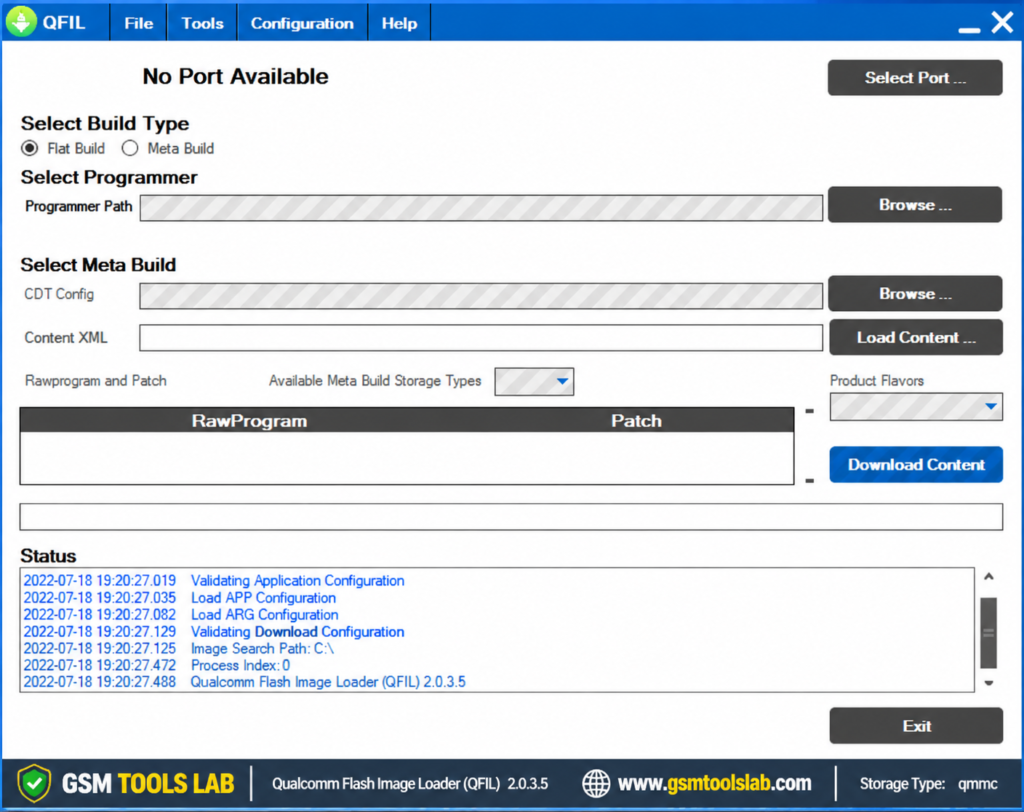
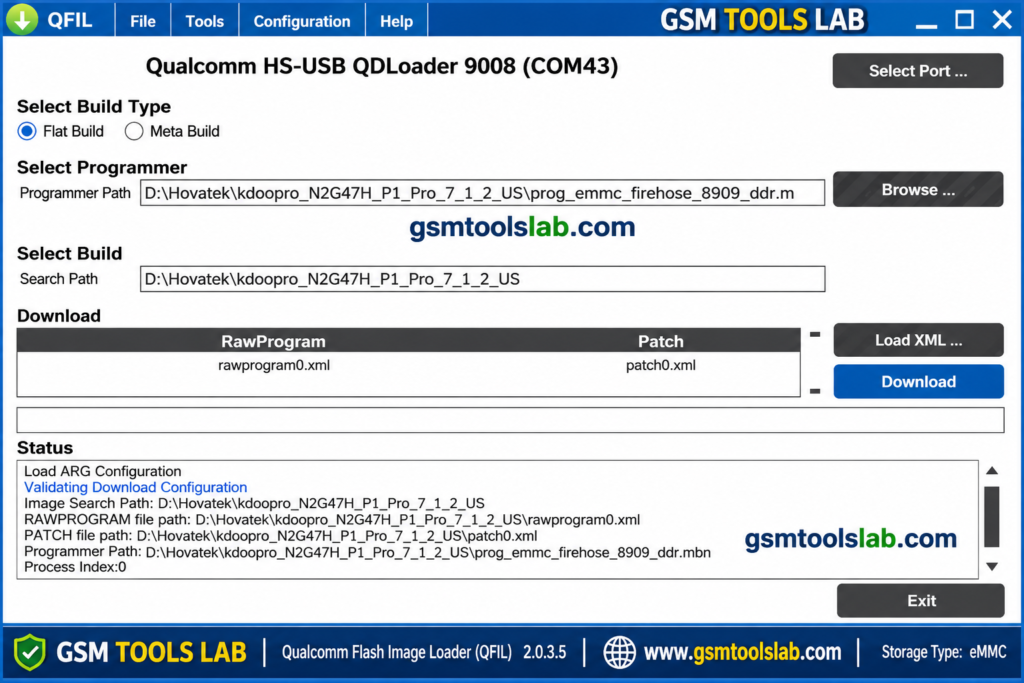
QFIL Tool is a flashing program made for Qualcomm devices. It belongs to QPST, the Qualcomm Product Support Tool, which service centers use. The tool talks to the phone through Qualcomm HS-USB QDLoader 9008, which is a recovery mode built into the chip. It uses a programmer file to start the transfer and then writes the firmware files. It works for Qualcomm phones only. It does not work on MediaTek, Exynos, or Apple devices.
Key Features of QFIL Tool
Stock Firmware Flashing
It writes stock firmware to Qualcomm devices, and you can upgrade, downgrade, or reinstall the system. Always use firmware made for your exact model.
Recovery of Bricked Phones
QFIL Tool can help with a phone stuck after a failed update or bad flash. It cannot fix hardware damage.
EDL Mode Support
EDL mode lets the PC reach the chip when Android will not start. The phone must show as Qualcomm HS-USB QDLoader 9008 in Device Manager.
Firehose Programmer Loading
The programmer is a .mbn or .elf file. It must match your phone’s chipset and model.
Flat Build
This option loads firmware with rawprogram and patch XML files. Some pages also list Meta Build but do not explain it.
Real-Time Log Box
The log shows each step. It helps you find errors such as Sahara failures.
Portable Program
You extract the files and run QFIL.exe. No setup is needed, but drivers must be installed separately.
What’s New in v2.0.3.5?
- Stable support for Qualcomm Snapdragon devices.
- Flat Build flashing with XML files.
- Real-time log box.
- Firehose programmer support.
QFIL Tool Supported Chipsets and Modes
| Group | Details |
|---|---|
| Chipsets | Qualcomm Snapdragon (selected models) |
| Mode | EDL 9008 |
| Build types | Meta & Flat Build |
| Brands often listed | Xiaomi, Oppo, Vivo, Samsung (Qualcomm models) |
| Required files | Programmer (.mbn or .elf), rawprogram XML, patch XML |
QFIL Tool Download Information
- Tool Name: QFIL Tool
- Version: v2.0.3.5
- File Type: ZIP or RAR
- Developer: Qualcomm Technologies
- File Size: 5.43 MB
Here is the Official download link 👇
QFIL Tool System Requirements
| Requirement | Details |
|---|---|
| Operating System | Windows 7, 8, 10, or 11 |
| Processor | Dual-core or better |
| RAM | 2 GB minimum |
| Storage | 100 MB free, plus room for firmware |
| Drivers | Qualcomm USB (QDLoader 9008) drivers |
| Other | USB 2.0 port and a good data cable |
How to Download and Install the Tool
- Download QFIL Tool v2.0.3.5 from the official website or from the gsmtoolslab.
- Extract the archive into its own folder.
- Scan the files with antivirus before you open them.
- Install the Qualcomm USB drivers and restart Windows.
- Put the phone in EDL mode. Methods differ by model.
- Check that Device Manager shows Qualcomm HS-USB QDLoader 9008.
- Open QFIL.exe, pick Flat Build, and load the programmer file.
- Load the rawprogram and patch XML files, choose the right storage type (UFS or eMMC), then start.
- Keep the cable connected until the process ends.
If the phone is not detected, try a USB 2.0 port and another cable.
Pros and Cons
| Pros | Cons |
|---|---|
| Small and portable | Qualcomm phones only |
| Works when Android will not start | Needs the right programmer and XML files |
| Real-time log box | Wrong files can brick a phone |
| Part of the known QPST suite | No official download page or license shown |
Conclusion
QFIL Tool is a small Windows program for flashing Qualcomm phones in EDL mode. It supports Qualcomm-based devices that use different flat builds and meta builds. Its simple interface and flashing logs make firmware tasks easier. Check your model, install the right drivers, use matching firmware, back up your data, and verify the file first.
Frequently Asked Questions
What is EDL mode?
EDL is a recovery mode built into Qualcomm chips. The phone appears as Qualcomm HS-USB QDLoader 9008.
What files does QFIL Tool need?
A programmer file (.mbn or .elf), a rawprogram XML file, and a patch XML file. All must match your phone.
How do I fix “Sahara Fail”?
Check that the programmer matches the chipset, reconnect in EDL mode, and try another cable and a USB 2.0 port. Reinstall the drivers if needed.
Can QFIL Tool remove FRP?
It is not a general FRP remover. FRP is an anti-theft feature, and steps differ by phone, so use it only on a phone you own.
Does it work on Samsung or MediaTek phones?
Only on Samsung phones with Qualcomm chips. It does not work on MediaTek or Exynos phones.