MOTO FRP Tool Download for Windows: Features & Guide

Motorola phones can show a Google account verification screen after a factory reset. MOTO FRP Tool is a Windows-based utility described by third-party websites for Motorola device servicing. The tool includes FRP removal and bootloader unlock functions through different methods.
Also Read Trusted Tools: TFM Tool Pro V3.4.2 MTK Free Download
Key Takeaways
- Platform: Windows PC or laptop.
- Device Range: Compatible Motorola Moto smartphones.
- Advertised Functions: FRP-related servicing, ADB, Fastboot, and bootloader operations.
- Additional Tools: Some listings describe XML-based firmware flashing and boot-loop recovery.
- Important: Support varies by model, Android version, and firmware.
What is MOTO FRP Tool?
MOTO FRP Tool is a Motorola-focused Windows utility and also the Viper Team TIR FRP Removal Tool. It is designed for selected Motorola servicing tasks, including FRP-related functions and bootloader operations.
FRP is a security feature that helps protect a phone after a factory reset. If a Google account was added to the device before the reset, Android may ask for that account during setup. This helps prevent unauthorized use of a lost or stolen phone. The tool’s available functions depend on the particular software package and device. Also, similarly named downloads may contain different files.
Key Features of MOTO FRP Tool
Motorola Device Support
The utility focuses on compatible Motorola Moto smartphones. However, it does not support every Motorola model. Compatibility can depend on the device variant, Android version, firmware, and security patch.
FRP-Related Functions
Third-party listings advertise functions related to Factory Reset Protection. These claims do not guarantee success on every phone. For a device you own, try Google’s account recovery options first if you have forgotten the original login.
ADB Functions
This tool collects device information, connection functions, and reboot operations where supported.
Fastboot and Bootloader Operations
Fastboot is used for certain Android bootloader and maintenance tasks. Listings describe bootloader-related and reboot functions in the tool. Availability depends on the connected device and its configuration.
MOTO FlashTool
Firmware operations require a file that matches the exact model and software variant. An incorrect file can cause serious software problems.
Portable Interface
Moto FRP Tool is portable, so you can run it without a lengthy installation process. It is convenient to keep and use when needed.
MOTO FRP Tool Download Information
- Tool Name: MOTO FRP Tool
- Version: Latest 2027
- Requirements: Selected Motorola models
- File Password: 🗝 None
- File Size: About 4.23 MB
Here is the Official download link 👇
System Requirements
| Requirement | Details |
|---|---|
| Computer | Windows PC or laptop |
| USB cable | Reliable USB data cable |
| Drivers | Compatible Motorola USB drivers; ADB/Fastboot drivers may be needed |
| Storage | Enough space to extract the package and keep required files |
| Device | Compatible Motorola phone |
| Permissions | Administrator access may be needed for drivers or software functions |
Exact minimum RAM, CPU, and Windows-version requirements have not been verified for one consistent release. Check the instructions included with the particular package instead of relying on specifications copied from another website.
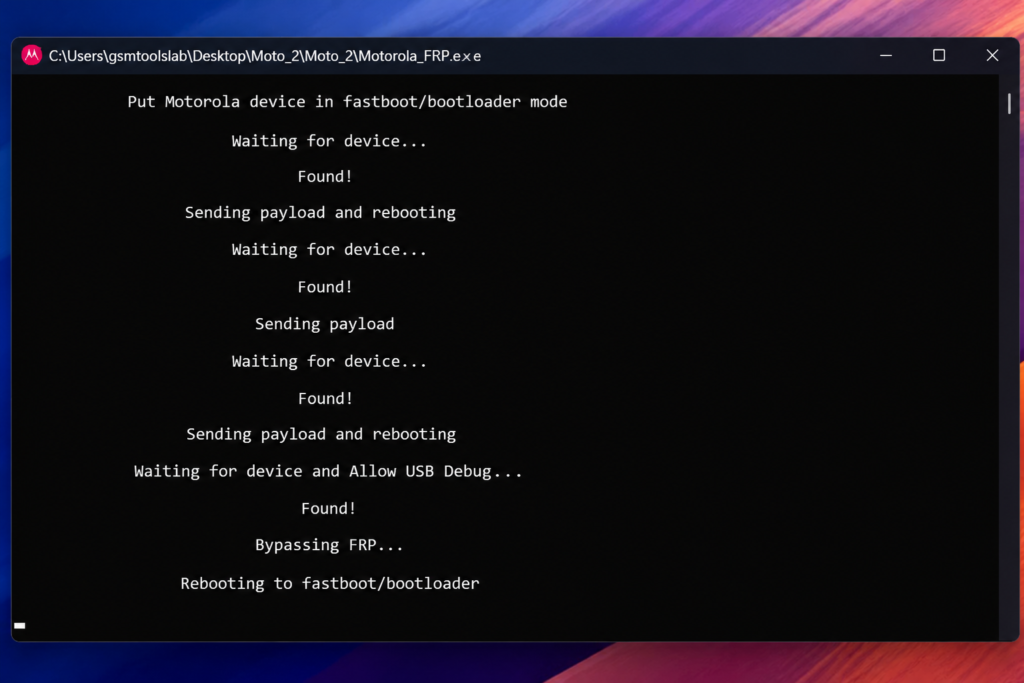
How to Download
- Download MOTO FRP Tool from the download button or a trusted source.
- Extract the downloaded archive.
- Extract the files to the C drive.
- Open the extracted folder.
- Run VyperAndTirFRPTool.exe.
- Install the required Motorola USB and ADB/Fastboot drivers.
- Connect the supported Motorola phone using a reliable USB cable.
- Select the appropriate ADB, Fastboot, Tools, or MOTO FlashTool function.
- Verify the selected device and selected operation.
- Start the process and wait for it to complete.
Pros and Cons
| Pros | Cons |
|---|---|
| Motorola-focused servicing options | Not every model is supported |
| ADB and Fastboot functions are listed | Correct drivers and device configuration may be required |
| Some packages describe firmware tools | Incorrect firmware can damage software |
| Portable use is described in some listings | Download authenticity may be difficult to confirm |
| Several maintenance functions in one interface | Some operations can erase data |
Conclusion
MOTO FRP Tool is described as a Windows utility for selected Motorola servicing tasks, including FRP-related functions, ADB, Fastboot, bootloader options, and—in some packages—firmware tools. Its exact features and compatibility depend on the release. Confirm the source, check your device model, and protect your data before attempting repairs. When a phone is stuck at Google verification, account recovery is the safest first step.
MOTO FRP Tool FAQs
1. What is MOTO FRP Tool used for?
It is a Windows-based utility described for selected Motorola servicing tasks. Advertised functions include FRP-related operations, ADB, Fastboot, and bootloader tools. Actual support varies by package and phone.
2. Does MOTO FRP Tool support all Motorola models?
No. Support depends on the exact model, device variant, Android version, firmware, and security patch. Check compatibility before starting a repair.
3. Does MOTO FRP Tool require USB drivers?
Compatible Motorola USB drivers may be needed. ADB or Fastboot functions may also require the appropriate computer-side drivers and a working data cable.
4. Is MOTO FRP Tool free?
Third-party listings make different claims about availability and licensing. A verified, current official price or license policy could not be established for the package linked above. Check the distributor’s terms before paying.
5. Can MOTO FRP Tool flash Motorola firmware?
XML-based firmware flashing. Use only firmware that matches the exact device model and variant, because an incompatible file can cause boot or software problems.
6. Does MOTO FRP Tool work on newer Android versions?
Support for newer Android releases is not confirmed across all packages. Android updates, security patches, and device differences can affect compatibility. Check the release documentation for your exact model.
7. What should I do if my Motorola phone asks for the previous Google account?
First, try recovering the Google Account through Google’s official recovery page. If you purchased the phone second-hand, ask the previous owner to remove their account or contact Motorola support with proof of ownership. This helps protect the legitimate owner and avoids risky unofficial downloads.
One Comment