Huawei FRP Tool V1.0 Free Download for Windows (Fastboot and BROM Mode)

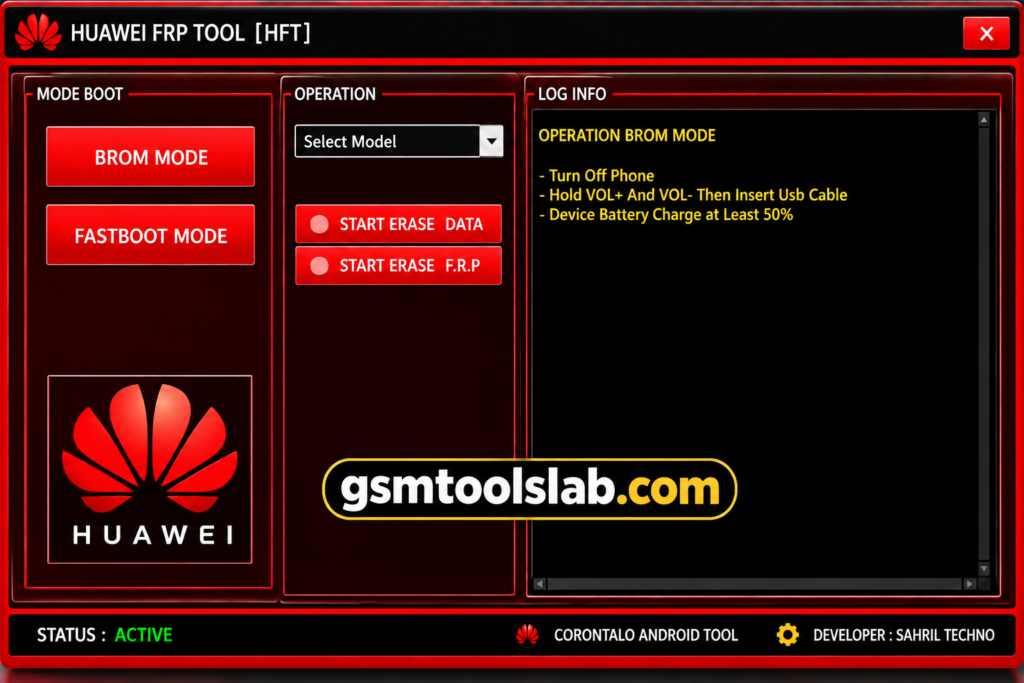
Locked out of your Huawei phone after a factory reset? The Huawei FRP Tool is a small Windows program that helps with Google account (FRP) lock and screen lock problems on supported Huawei phones. It connects to your phone through a USB cable in Fastboot or BROM mode. The MediaTek chipsets are used for communication between the tool and the Huawei device to enable repair options.
Key Takeaways
- Tool: V1.0, a free Windows utility of about 58 MB.
- Modes: Fastboot, Boot, and BROM mode.
- Chipset: Works through MediaTek communication on supported models.
- Limits: No macOS build, and support for newer HarmonyOS phones is limited.
- Rule: Success depends on your phone model, firmware, and security patch.
What Is the Huawei FRP Tool?
FRP means Factory Reset Protection. Google added it to Android 5.1 in 2015 to stop thieves from using a stolen phone. After a reset, the phone asks for the last synced Google account.
The Huawei FRP Tool is Windows software made to service Huawei phones in this situation. It can also help when you forget a PIN, password, or pattern. It talks to the phone in Fastboot, Boot, or BROM mode. For this, you need proper Huawei USB drivers and a stable cable connection.
Key Features of Huawei FRP Tool
- FRP removal: Helps when your phone asks for a Google account after a reset.
- Screen unlock: Works on forgotten PIN, password, and pattern locks on compatible models.
- Multiple modes: Supports Fastboot, Boot, and BROM mode for device communication.
- Simple dashboard: Beginners and repair experts can both use it with a few clicks.
- Lightweight: It needs little space and runs on older Windows computers.
Fastboot Mode vs BROM Mode
| Mode | What It Means | Best For |
|---|---|---|
| Fastboot Mode | A bootloader screen used to send commands from a PC. | Phones that can still reach the bootloader |
| BROM Mode | A low-level MediaTek mode that starts before Android. | MediaTek-based phones that need deeper access |
| Boot Mode | A normal start-up link used by some tool options. | Models that support this connection |
Huawei FRP Tool V1.0 Download Information
- Tool Name: Huawei FRP Tool
- Version: V1.0
- Requirements: Huawei USB drivers, HiSuite if needed
- File Password: 🗝 None
- File Size: 58 MB
Here is the official download link 👇
System Requirements
- Windows PC (32-bit or 64-bit)
- Huawei USB drivers installed
- A good USB cable and a free USB port
- A phone with enough battery (at least 50% is safer)
- Compatible Huawei model, chipset, and firmware
How to Use the Huawei FRP Tool
- Download the tool from a trusted source or the official website and scan the file with antivirus.
- Install the Huawei USB drivers and HiSuite if needed.
- Extract the file and open the program.
- Connect your Huawei phone to the PC with a USB cable.
- Put the phone in the mode your model needs (Fastboot, Boot, or BROM).
- Select your model, choose the FRP or unlock option, and follow the on-screen steps.
- Restart the phone and check the result.
Pros and Cons
| Pros | Cons |
|---|---|
| Simple and easy interface | No macOS version |
| Quick process with few steps | Limited support for HarmonyOS phones |
| Fastboot and BROM support | Success depends on model and firmware |
| Light on PC resources | Newer security patches may block old tools |
Conclusion
The Huawei FRP Tool V1.0 is a light and simple Windows utility for FRP and screen lock issues on supported Huawei phones. It works best on older EMUI-based models and MediaTek devices. Check your model first, use proper drivers, and try official recovery before any tool.
Huawei FRP Tool FAQs
What is the Huawei FRP Tool?
It is a Windows program that helps service Huawei phones locked by FRP, PIN, password, or pattern. It uses Fastboot, Boot, or BROM mode.
Is the Huawei FRP Tool free?
The V1.0 file is offered as a free download. Some other tools with similar names ask for a paid key, so read the details first.
How do I FRP unlock my Huawei phone?
The simplest way is to sign in with the Google account that was synced before the reset. A servicing tool is a backup option for phone owners.
What is the FRP code for Huawei?
There is no universal FRP code for Huawei. If the lock appears after a reset, use the previous Google account or contact Huawei support.
Does the Huawei FRP Tool work on every Huawei model?
No. Support changes with the model, chipset, EMUI version, firmware, and security patch.
Does it work on HarmonyOS phones?
Support for HarmonyOS devices is limited. The tool works better on older EMUI-based phones.
How do I unlock a Huawei phone if I forgot the password?
Huawei suggests a factory reset, which erases your data. After the reset, you may need your Google account because of FRP.
What is BROM mode?
BROM is a low-level start-up mode on MediaTek chips. It lets a PC tool talk to the phone before Android loads.
Is the Huawei FRP Tool safe to use?
It can be safe if you download it from a trusted source, scan it, and use it on your own phone. Never run it from unknown links.
Will I lose my data when I use it?
A factory reset already erases data. Screen unlock options may keep data on some models, but results are not guaranteed, so back up when you can.
One Comment