HSD AIO Tool v1.0.8 Download for Windows – Android Unlock (Tested 100%)

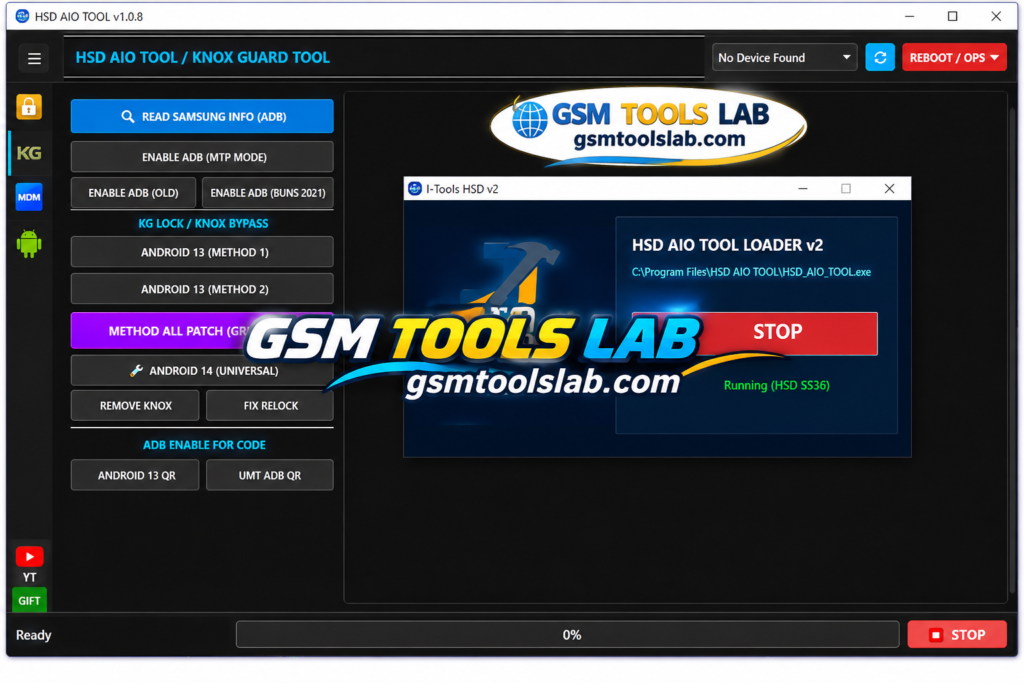
Looking for a Windows tool to handle Android phone servicing, FRP removal, device resets, and other mobile repair tasks? HSD AIO Tool v1.0.8 is an all-in-one mobile servicing utility designed for GSM technicians and Android users. It brings different servicing functions into one desktop application, helping users work with supported Samsung, Xiaomi, Redmi, POCO, Vivo, Oppo, Realme, Motorola, Infinix, Tecno, and other Android devices. The tool covers multiple chipset platforms, including MediaTek (MTK), Qualcomm, and Spreadtrum (SPD), with functions for device unlocking, FRP servicing, MDM, KG, and ADB, MTP, and Fastboot operations.
Also Read Trusted Tools: Amlogic USB Burning Tool | Avatar Auth Tool
What Is HSD AIO Tool v1.0.8?
HSD AIO Tool v1.0.8 is a Windows-based, all-in-one mobile servicing utility designed for Android smartphones and tablets. It brings multiple device servicing and management functions into a single desktop interface, making it useful for GSM technicians and mobile repair users who work with different Android brands and chipset platforms.
The tool is designed to handle various servicing tasks, including device unlocking, Factory Reset Protection operations, Mi Account-related functions, MDM servicing, and device resets. It also includes connectivity and diagnostic options through Android Debug Bridge (ADB), Media Transfer Protocol (MTP), and Fastboot modes. HSD AIO Tool supports multiple brands, including chipset platforms such as MediaTek, Qualcomm, and Spreadtrum (SPD). Its intended device coverage includes brands such as Samsung, Xiaomi, Redmi, POCO, Oppo, Vivo, Realme, OnePlus, Motorola, Infinix, and Tecno.
Features of HSD AIO Tool
Device Information and Basic Servicing
- Read Device Information: Detect connected Android devices and read available hardware and software details.
- Boot Device: Access supported device boot and servicing operations.
- Factory Reset: Perform supported factory reset and userdata operations.
- Erase FRP: Access available Factory Reset Protection servicing functions.
- Live Execution Logs: Monitor running operations and view tool responses.
- Automatic Port Detection: Detect available USB and device communication ports.
Partition Management and Security Backup
HSD AIO Tool includes partition-level functions for supported devices and chipset platforms.
- Read device partitions.
- Erase selected partitions.
- Write partition files.
- Apply supported partition patches.
- Back up security-related partitions.
- Restore previously saved security data.
- Access supported eMMC and UFS storage loaders.
MediaTek, Qualcomm and Spreadtrum Support
- MediaTek (MTK): Universal MTK auto-detection and supported DA (Download Agent) operations.
- Qualcomm (QLM): Supported Qualcomm device detection and servicing operations.
- Spreadtrum (SPD) / Unisoc: Available servicing functions for compatible devices.
- DA and Loader Management: Cloud-based automatic downloading and verification of supported DA and loader files.
- Test Point Viewer: Provides test point references and connection instructions for supported devices.
- UFS and eMMC: Loader support for compatible storage configurations, including v1.0 and v8.2 loader formats.
Samsung FRP, MTP and KG Operations
- Samsung MTP device information reading.
- Supported MTP connectivity operations.
- Android 16 MTP FRP servicing option.
- June 2024 MTP FRP method.
- Multiple ADB enabling options through supported MTP and QR-based methods.
- Samsung device, binary, and Knox status information.
- Knox Guard (KG) management operations.
- Supported KG lock and relock-related functions.
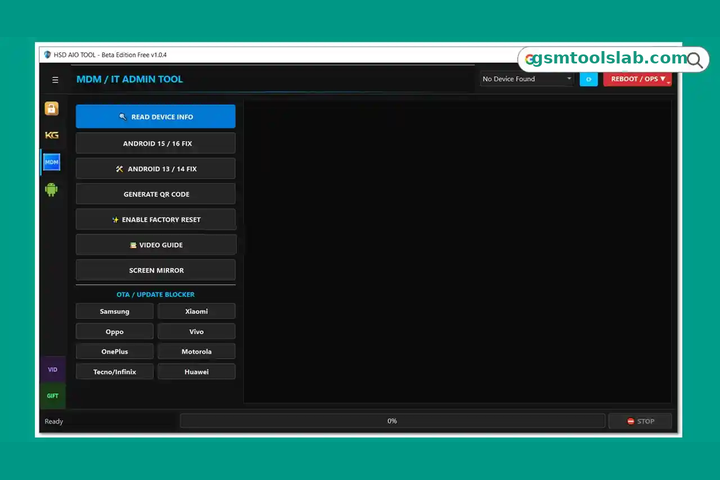
MDM and IT Admin Operations
- Android 13 and Android 14 MDM servicing options.
- Android 15 and Android 16 MDM-related functions.
- IT Admin and Device Owner management options.
- QR Code provisioning support.
- OTA update management options.
- Factory reset controls for supported devices.
- Live screen mirroring and device management utilities.
Xiaomi, Redmi and POCO ADB Functions
- Mi Account-related servicing options.
- Mi Account reset functions.
- Anti-Relock repair options.
- Read Xiaomi device information.
- Read and manage supported critical data.
- Identify CPU, brand, and model information.
- Read IMEI 1 and IMEI 2 where supported.
ADB, MTP and Fastboot Utilities
- ADB Mode: Read device information, manage applications and packages, and access supported diagnostic functions.
- MTP Mode: Read device information and use available MTP-based utilities.
- Fastboot Mode: Read device information and perform supported reboot operations.
- Application Manager: Manage installed applications and packages where supported.
- Hardware Diagnostics: Access available device diagnostic information.
- OTA Management: Use supported OTA update control options.
- Qualcomm EDL: Reboot compatible Qualcomm devices into Emergency Download Mode (9008).
Supported Brands and Chipsets
Supported Android Brands
- Samsung
- Xiaomi
- Redmi
- POCO
- Vivo
- iQOO
- OPPO
- Realme
- Motorola
- TECNO
- Infinix
- Itel
- Nothing
Supported Chipsets and Platforms
- Qualcomm Snapdragon: Supports Qualcomm servicing operations, including compatible EDL 9008, ADB, and Fastboot modes.
- MediaTek (MTK): Supports compatible MTK Helio and Dimensity-based devices through available servicing and Download Agent (DA) methods.
- Samsung Exynos: Supports available Samsung device operations where compatible protocols and methods are provided.
- Unisoc / Spreadtrum (SPD): Includes supported operations for compatible Unisoc and Spreadtrum-powered Android devices.
HSD AIO Tool v1.0.8 Details
| Information | Details |
|---|---|
| Tool Name | HSD AIO Tool |
| Latest Version | v1.0.8 (Password: gsmyogesh.com) |
| Platform | Windows PC |
| Category | All-in-One Mobile Servicing Tool |
| Connection Type | USB |
| Supported Chipsets | MediaTek, Qualcomm, Unisoc, and compatible platforms |
| Supported Modes | ADB, MTP, Fastboot, and supported EDL |
| License | Check current release terms |
HSD AIO Tool v1.0.8 System Requirements
| Component | Requirement |
|---|---|
| Operating System | Windows 7 / 8 / 10 (32-bit & 64-bit) |
| Processor | Intel Core 2 Duo / AMD Dual-Core |
| RAM | 4 GB |
| Storage | 500 MB free space |
| USB Port | Available USB port |
| USB Drivers | Compatible Android USB drivers |
| Software Runtime | Required Windows components |
| Internet | Required for online functions, if applicable |
| Permissions | Standard Windows access |
How to Download and Install HSD AIO Tool v1.0.8
- Find the Software Package: Visit the developer’s official website or click the download button above for HSD AIO Tool v1.0.8.
- Download the Archive: Download the available ZIP or RAR package to your Windows computer.
- Extract the Files: Use WinRAR or 7-Zip to extract the downloaded archive into a separate folder.
- Scan the Files: Check the extracted files with Windows Security or another trusted antivirus before running the executable.
- Run as Administrator: If the package includes an executable setup file, right-click it and select Run as administrator.
- Complete the Setup: Follow the available installation instructions and open the application.
- Register or Log In: If the software requires an account, complete the registration process using the available login screen.
- Connect Your Android Device: Install the appropriate USB drivers and connect your smartphone using a working USB data cable.
- Start a Supported Operation: Select the required servicing module and follow the instructions displayed by the software.
Pros and Cons
Pros
- All-in-One Interface: Combines multiple Android servicing modules in one Windows application.
- Multi-Brand Support: Includes popular brands such as Samsung, Xiaomi, Redmi, POCO, Vivo, iQOO, OPPO, Realme, Motorola, Infinix, and TECNO.
- Multiple Chipset Support: Provides servicing options for MediaTek, Qualcomm, and Spreadtrum/Unisoc platforms.
- Samsung Servicing: Includes dedicated MTP, ADB, and Knox Guard (KG) management modules.
- Xiaomi ADB Functions: Offers Mi Account-related operations, device information reading, and Anti-Relock options.
- Partition Management: Supports available partition reading, writing, erasing, and patching operations.
- MDM Tools: Includes dedicated Mobile Device Management and IT Admin-related functions.
Cons
- Internet Dependency: Some functions require an internet connection for account login and cloud-based loader downloads.
- Loader Server Errors: Certain operations may fail when the required DA or loader files are unavailable on the server.
- Device Compatibility: Not every feature works with all smartphone models, Android versions, or security patch levels.
- Registration Requirements: Account registration or activation may be necessary before accessing servicing functions.
- Driver Installation: Some operations require additional ADB, Fastboot, Samsung, or chipset-specific USB drivers.
- Windows Security Warnings: Unverified executable files may trigger Windows Defender or other
FAQ’s
Is HSD AIO Tool v1.0.8 free to use, and do I need a dongle?
HSD AIO Tool is designed as a Windows-based mobile servicing utility. Registration or activation requirements may depend on the release. Check the v1.0.8 package details to confirm whether a free account or license is required.
Which Android brands does HSD AIO Tool support?
HSD AIO Tool includes support for multiple Android brands, such as Samsung, Xiaomi, Redmi, POCO, Vivo, iQOO, OPPO, Realme, Motorola, Infinix, TECNO, Itel, and Nothing.
Does HSD AIO Tool support MediaTek and Qualcomm devices?
Yes, the tool is described as supporting MediaTek and Qualcomm platforms, along with Spreadtrum/Unisoc devices. Specific operations depend on the chipset, device model, drivers, and available loaders.
Will a factory reset or lock-related operation erase personal data?
A factory reset or userdata wipe can erase photos, apps, messages, and other personal files. The effect of other servicing operations depends on the selected function and device. Back up important data before performing any reset or repair operation.
Why does HSD AIO Tool show a loader download error?
A download error can occur because of an internet connection problem, temporary server issues, or an unavailable loader.
Why is my Android device not detected by HSD AIO Tool?
Device detection problems may be caused by missing or outdated USB drivers, a faulty cable, an incorrect connection mode, or disabled USB debugging. Install the compatible drivers, use a reliable data cable, and select the connection mode required for the operation.
Does HSD AIO Tool require an internet connection?
Yes, an internet connection may be needed for account login, online services, or downloading cloud-based loader files.
Which Windows versions support HSD AIO Tool?
HSD AIO Tool is intended for Windows PCs. Windows 10 and Windows 11 are suitable options to consider, while compatibility with older Windows versions should be checked against the requirements of the v1.0.8 package.